

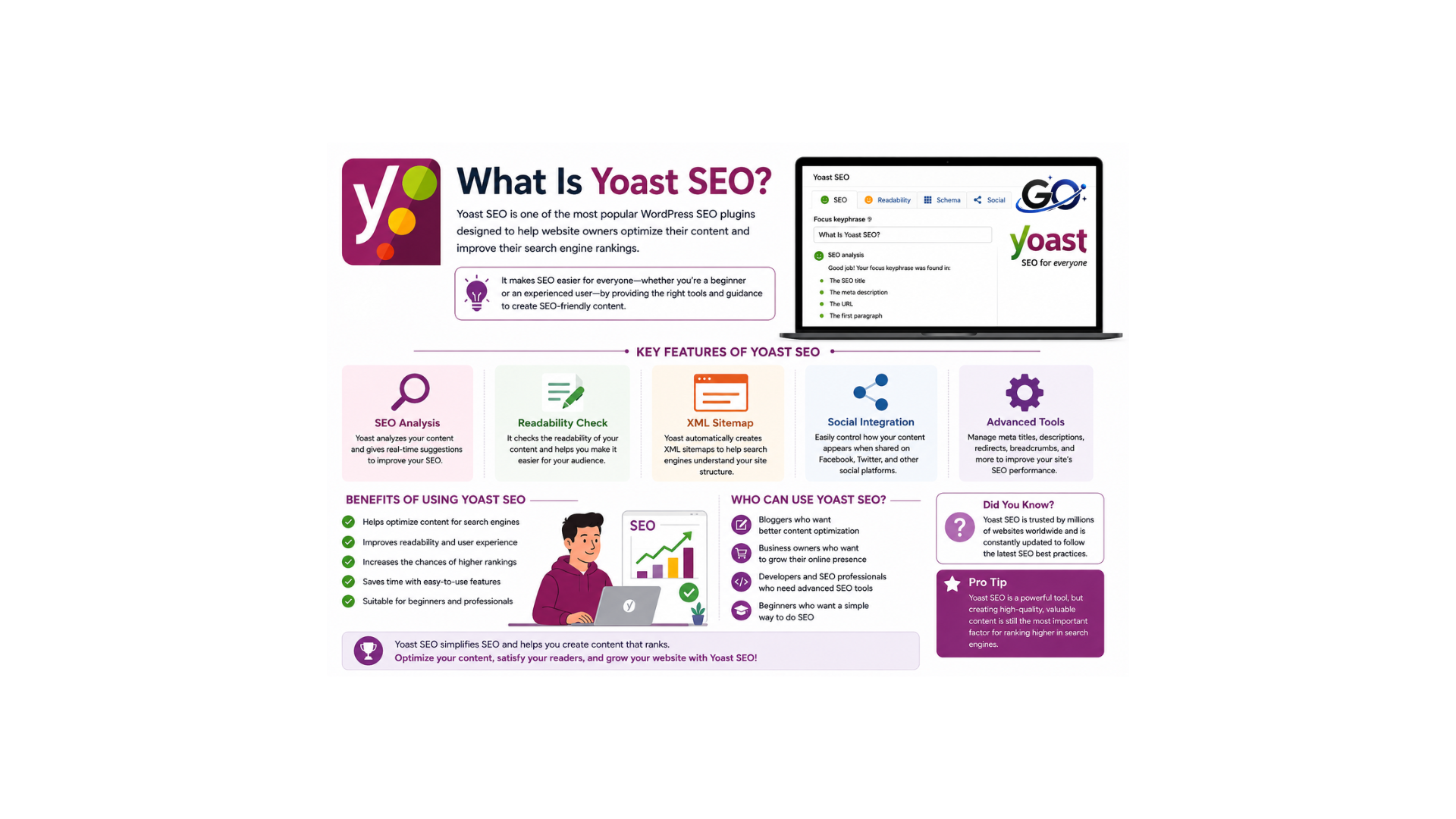
Yoast SEO is a popular WordPress plugin designed to help you improve your site’s visibility in search engines.by offering suggestions for improving the content and structure of your website.
Everything you need to do simple SEO activities is included in the free edition. . For example, making sure your titles are the perfect length and including keywords in the ideal places.
Advanced features like receiving AI-powered recommendations and optimising for multiple keywords are only available with the premium edition.
Why Is Yoast SEO Important?
Search engines evaluate websites based on hundreds of ranking factors. Many website owners struggle to understand these factors and apply them correctly. Yoast SEO helps bridge this gap by providing real-time feedback and actionable recommendations. Instead of guessing what needs improvement, users receive clear guidance directly within the WordPress editor.
Yoast SEO is important because it helps improve website rankings, increase search visibility, and create a better user experience. It ensures that important SEO elements such as keyword placement, meta descriptions, title tags, and content structure are properly optimized. As competition online continues to grow, using a reliable SEO plugin can provide a significant advantage.
Yoast SEO Setup
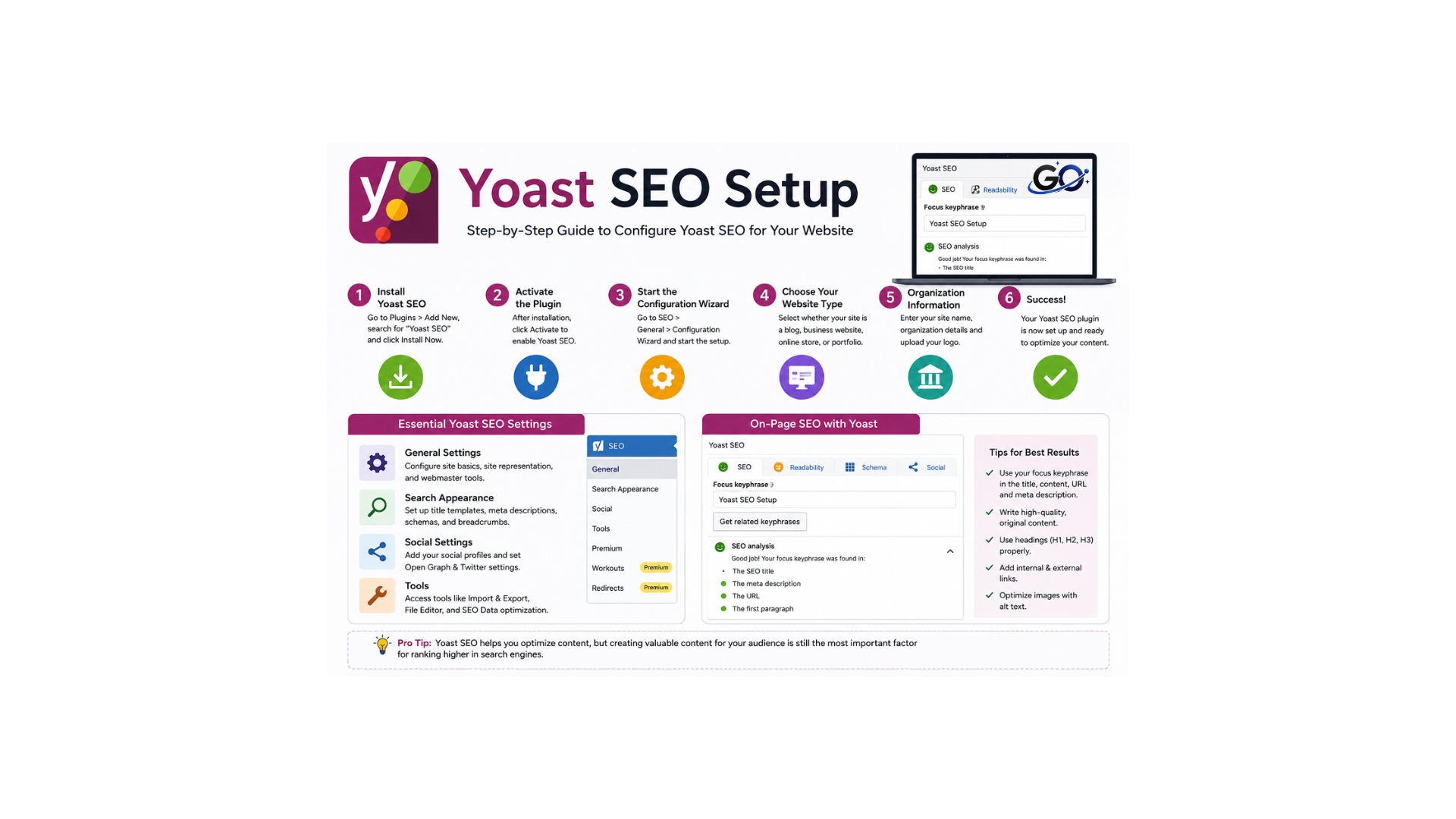
Click the Start First-Time Configuration button to launch the first-time configuration tool after installing the plugin. If you left the page, you can access the configuration tool by going to Yoast SEO > General and clicking the First-time Configuration link. There are five steps in the Yoast SEO configuration. Let’s walk through each of them.
Step 1: SEO Data Optimization
Yoast must first examine your website as though it were a search engine in order to identify any technical problems that need to be fixed; this does not alter any of your site’s settings or content.
After the optimisation is complete, this notice will show up:
Please be aware that the time it takes to optimise your website depends on its size.
Step 2. Site Representation
You will add details about your website in this step. Yoast SEO will use this information to produce structured data.
First, let Yoast SEO know if the website represents a company or an individual. Next, submit a logo, the name of the organization, and the name of the website.
Step 3: Social Profiles
You may link your social media accounts here. The default choices are Facebook and X (Twitter). To add other accounts, click Add Another Profile.
Step 4: Personal Preferences
At this stage, select if you want to get emails from Yoast SEO with recommendations, advice, and product information.If so, please provide your email address. Next, decide if you want to give Yoast SEO access to your data so they can enhance their plugin.
Step 5: Finish Configuration
The setup procedure is complete! You can visit your SEO dashboard or click the icon to find out more about Yoast SEO.
How to Install Yoast SEO
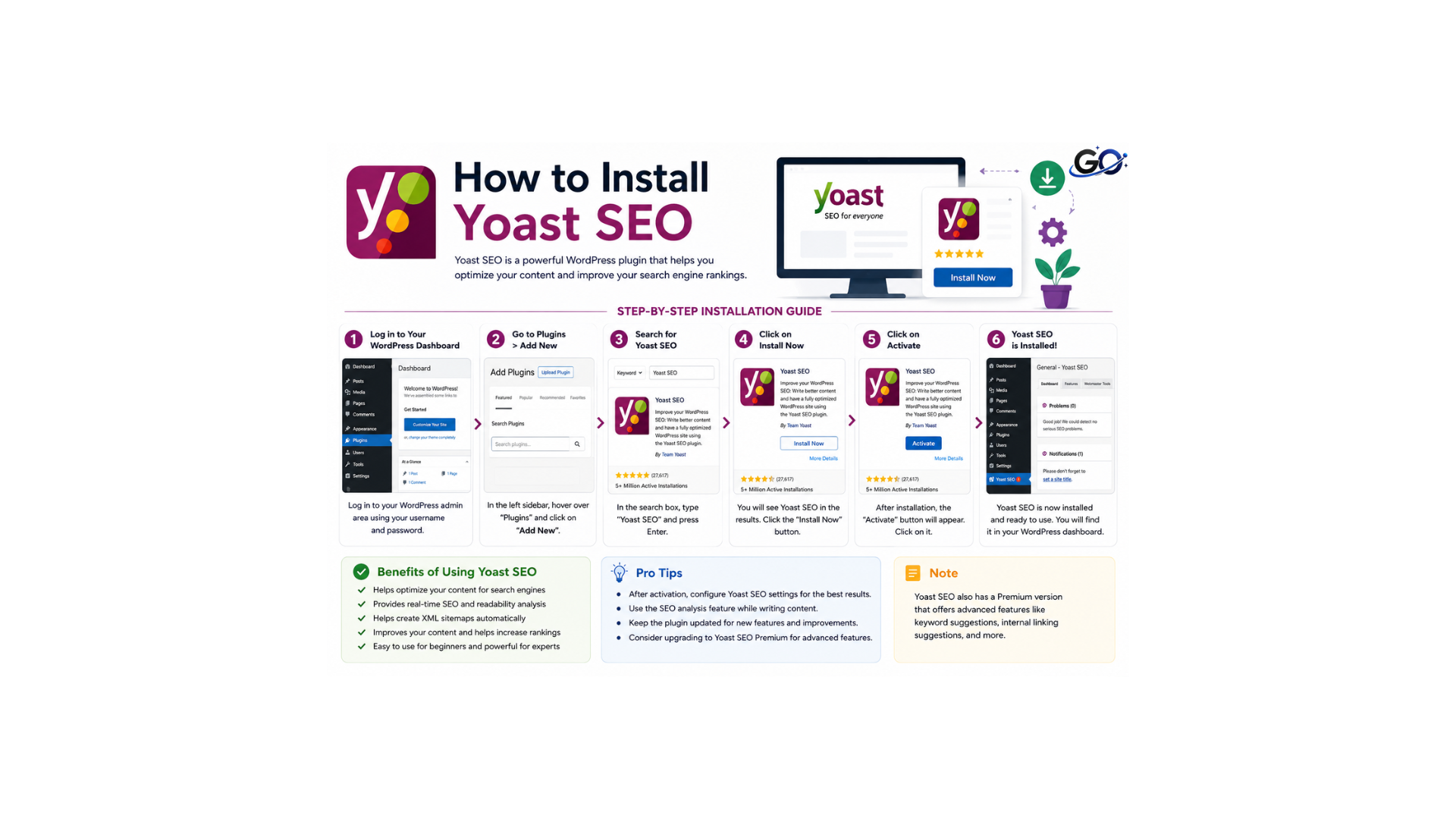
Like any other WordPress plugin, Yoast SEO is installed and turned on.
Go to Plugins > Add New in your WordPress dashboard to install the free version. In the search bar, type “Yoast SEO.” At the top of the list will be the plugin.
Click the Install Now button. Once it installs, click Activate.
How to Use On-Page SEO with Yoast SEO
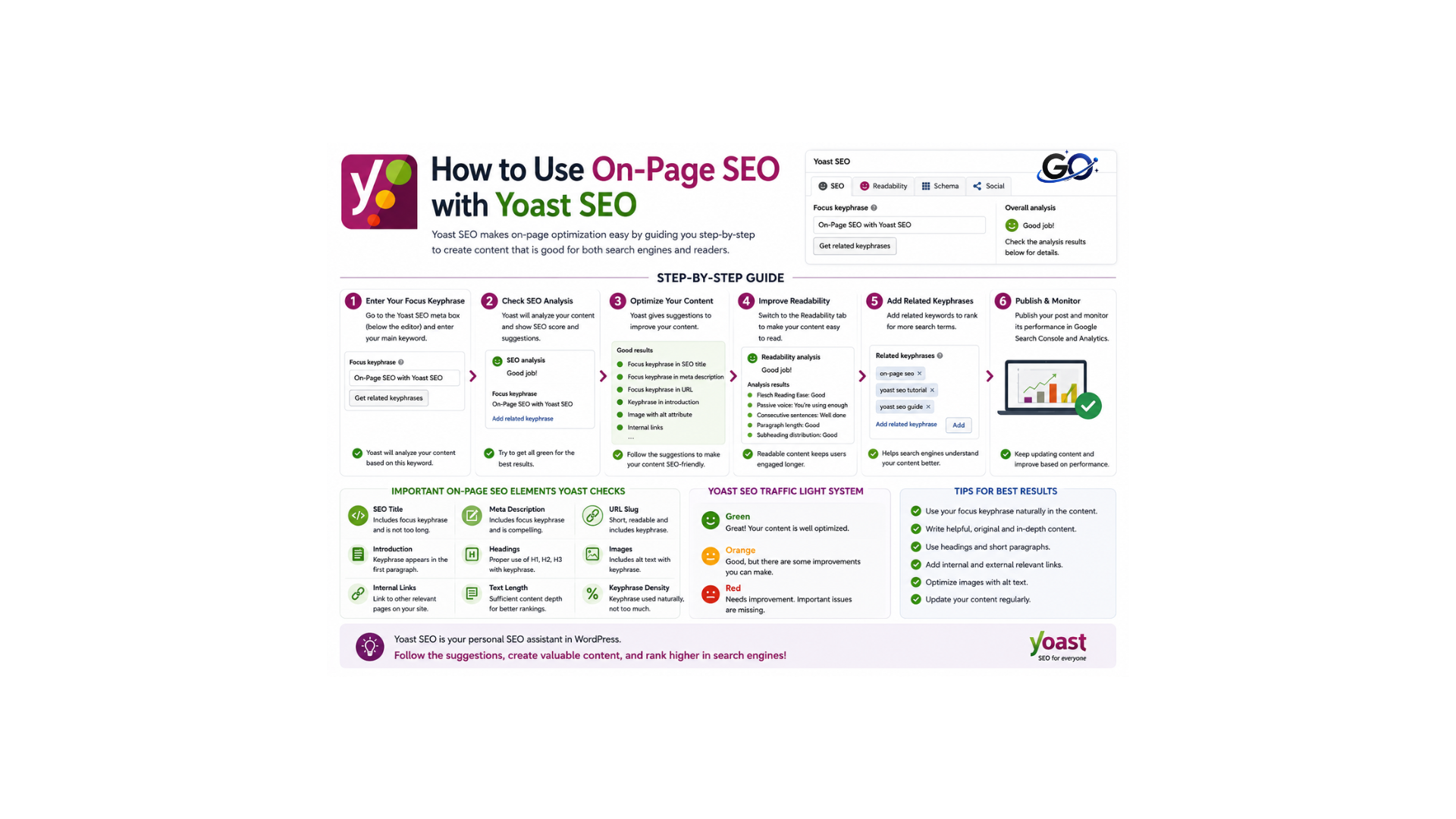
You can instantly optimise your SEO content for every post or page using Yoast SEO, an on-page SEO tool. Using Yoast SEO increases the chance of better rankings in SERPs.
SEO
You may view a real-time content analysis of your post on the SEO tab. It makes use of the green light system, which assigns a rating of “good,” “okay,” or “needs improvement” to the substance of your posts.Yoast evaluates the content after a keyword is added and makes recommendations for enhancements.
Enter Your Target Keyword
Enter your primary keyword in the “Focus keyphrase” section of the Yoast SEO box located beneath your WordPress editor (or in the sidebar if you’re using the block editor). Which is the primary term you want your page to rank for, given it’s of interest to your target audience.
If you need help determining which primary keywords to target, use Semrush’s Keyword Magic Tool.
Enter a broad seed keyword (like “vegan cooking”) and your website’s domain (e.g., “loveandlemons.com”), select your target location (such as the U.S.), and click “Search.”
After that, you can assess the following to decide which keywords to focus on:
Search intent (Intent)
the fundamental purpose of a user’s search. Knowing this enables you to produce content that genuinely satisfies their wants. Keywords can be categorized as transactional, commercial, navigational, and/or informational.
Search volume (Volume)
Higher search volume generally means more potential traffic. However, it may also result in increased rivalry.
Personal Keyword Difficulty (PKD %)
Estimates how challenging it will be for your specific website to rank in the top 10 results for this keyword. Lower PKD % indicates an easier keyword to target.
Yoast’s price structure can be a little confusing.
Include a Focus Keyphrase,Title tag,Meta description,URL slug.
Yoast offers areas where you may personalise your content’s URL slug (the last portion of the URL that identifies the page), meta description (HTML that provides a page summary and may appear in search results), and title tag (HTML that specifies the page title and may appear in search results).
Here are some tips for writing each:
Focus Keyphrase
This is the keyword or keywords you’d like that particular page on your website to rank forYour keyword research should result in your focus keyphrase. Check this out if you haven’t done any keyword research, or contact us to talk about how we can assist.
Title tag
Create a headline that draws readers in and appropriately summarises your material. Ideally, start with your focus keyphrase. If it appears in search results, keep it under 60 characters to prevent truncation.
Meta description
Write a succinct, educational synopsis of your material that emphasises its special selling point. If the description appears in search results, try to keep it between 150 and 160 characters.
URL slug
Make a brief, informative URL with your focus keyword in it. For readability, omit superfluous words or characters and divide words with hyphens.
You can see how your title tag and meta description can show up in search results by using Yoast’s snippet preview function. .
Review the SEO Analysis
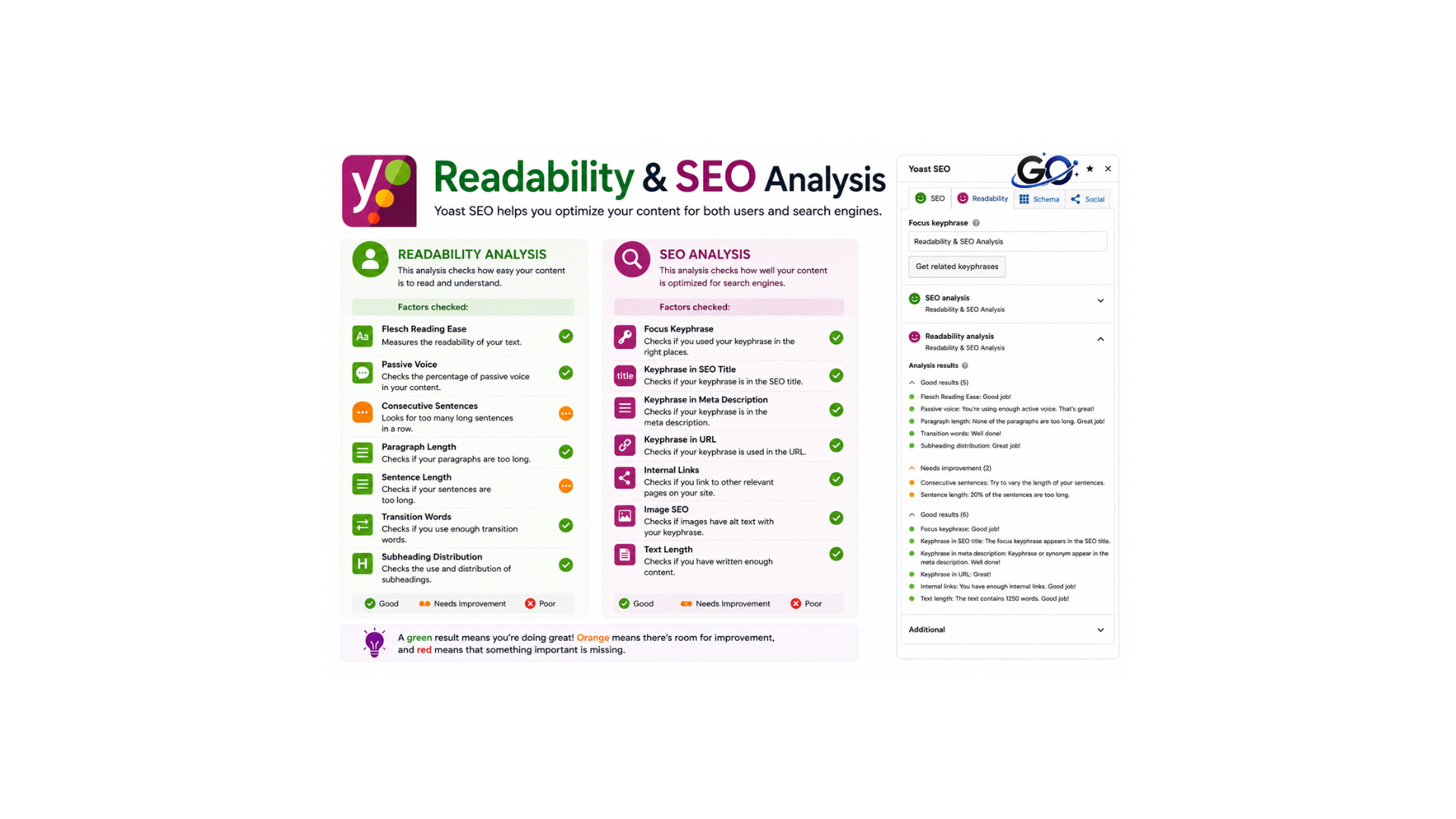
Yoast SEO will evaluate your page and provide colour-coded feedback once you’ve written your content and entered your focus keyphrase or keyphrases:
Green: Shows things you’ve optimised well.
Orange: Indicates areas that could use improvement
Red: Draws attention to more pressing problems that require attention.
Readability Analysis
The plugin evaluates content readability in addition to SEO elements, which is becoming a more crucial ranking factor as search engines give priority to user experience. The analysis of readability looks at:
Sentence Length
Identifies overly long sentences that might confuse readers.
Paragraph Length
Text blocks that seem like frightening text walls are flagged.
Passive Voice Usage
Calculates the percentage of passive constructions and suggests more direct alternatives.
Transition Words
Check whether you’ve included enough transitional phrases to guide readers through your content logic.
Subheading Distribution
Subheading distribution is the proper use of headings and subheadings to organize content into clear sections. It improves readability, user experience, and helps search engines understand the structure of your article.
Internal/External Links
The tool evaluates your linking strategy, ensuring you’ve included both internal links to your own content and external links to authoritative sources when appropriate.
Image Optimization
The analysis determines whether photos include alt text that contains your focus keyphrase, which is a crucial ranking aspect that is frequently disregarded.
XML Sitemaps
For every type of article, Yoast SEO automatically creates XML sitemaps. It lacks a specific website for viewing or managing your XML sitemaps in order to keep things simple.However, by going to the SEO Settings × General × Site Features tab, you can enable or disable XML sitemaps.
Sitemaps for news: For news websites to send Google their most recent content
Sitemaps for videos: Assist Google in locating and indexing video content
Local sitemaps: To increase exposure in local searchesA crucial component of SEO is sitemaps. As a result, you need an SEO plugin that efficiently handles them.
Schema Markup
You can use a unique kind of HTML code called schema markup to provide search engines with more details about your website. Rich snippets on SERPs are produced as a result. For instance, search snippets like the one below appear when you add recipe schema to a page or post that includes an apple pie recipe:
Robots.txt and .htaccess Management
These critical server files control how search engines access your site. The plugin provides safe interfaces to modify these without risking server configuration errors.
Benefits of Using Yoast SEO
Using Yoast SEO offers several benefits that contribute to long-term website growth.Improved search engine ranks are one significant benefit. Website owners can increase their chances of showing up higher in search results by optimising key ranking variables by adhering to the plugin’s recommendations.
Another benefit is increased organic traffic. Higher rankings typically lead to more clicks and visitors. Since organic traffic is highly targeted, it often results in better engagement and conversion rates compared to other traffic sources.
Yoast SEO also improves content quality. The readability analysis feature encourages users to create clear, structured, and engaging content. Better content not only helps SEO performance but also improves the overall user experience.
Additionally, the plugin saves time by automating technical tasks such as XML sitemap creation, schema implementation, and canonical URL management. This enables website owners to concentrate more on developing content and expanding their businesses.
Yoast SEO will automatically add schema metadata to your WordPress pages and posts. Go to SEO × SEO Settings × Posts to see the default settings. Next, navigate to the Schema section by scrolling down.
Yoast SEO Free vs Premium
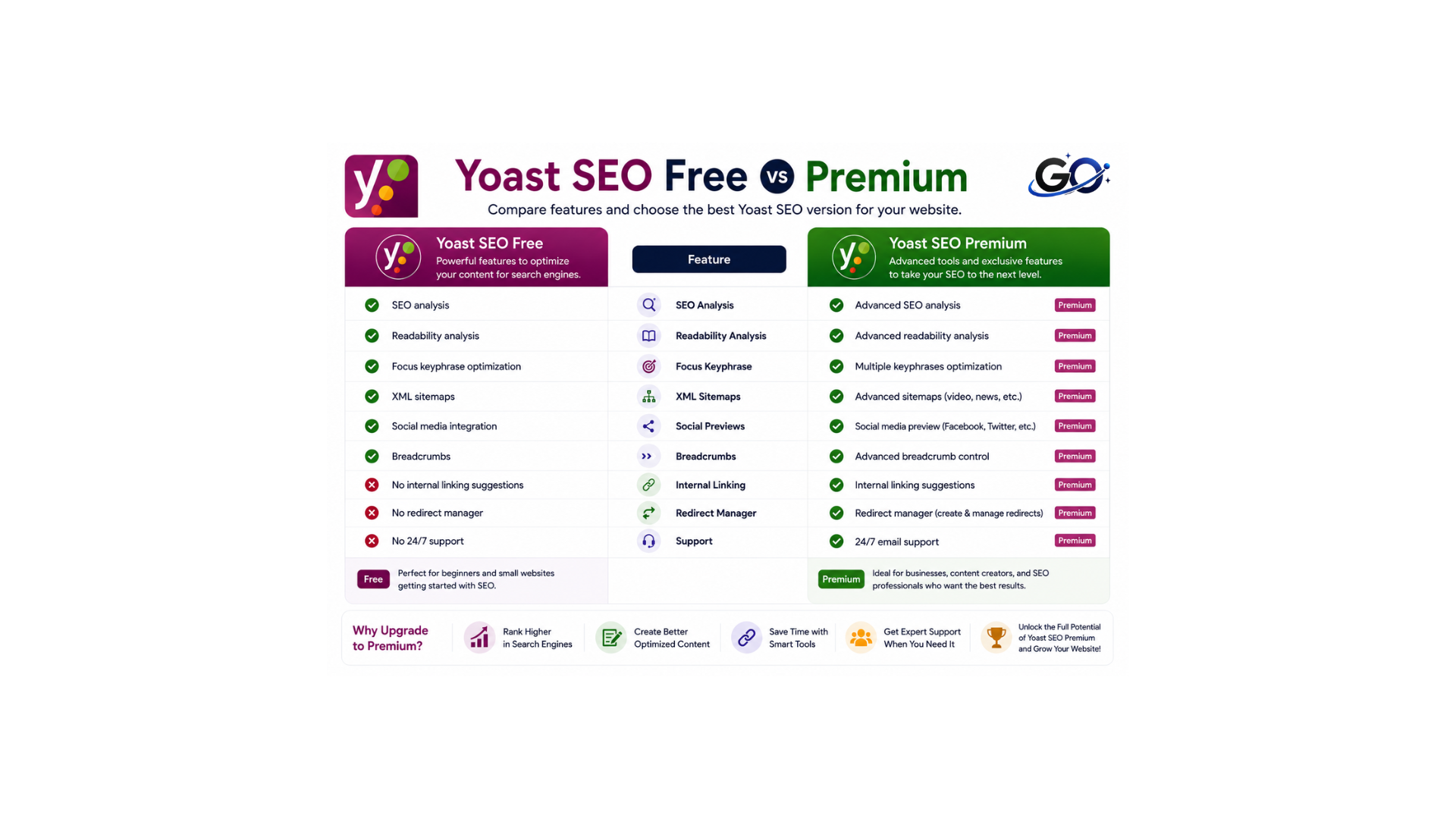
There are two versions of Yoast SEO: a paid edition with extra functionality and a free version with basic features. While the paid version gives more sophisticated tools like social media previews, internal linking help, and content creation recommendations, the free version offers the fundamentals of basic WordPress SEO optimization.
Yoast’s price structure can be a little confusing. . Yoast SEO essentially has three price tiers:
Basic functionality is free.
Premium: provides advanced functionality for $99 a year.
Plugin Subscription: A five-plugin bundle with Google Analytics integration costs $229 a year.
Conclusion
Yoast SEO is one of the most powerful and widely used SEO plugins available for WordPress. It helps website owners optimize content, improve technical SEO, enhance readability, and increase search engine visibility. With features such as keyword analysis, XML sitemaps, schema markup, meta optimization, and social media integration, Yoast SEO makes SEO more accessible and effective for users of all skill levels. By using Yoast SEO correctly and following SEO best practices, website owners can improve rankings, attract more organic traffic, and build a stronger online presence for long-term success.