

Improve SEO with page speed optimization best practices. Boost loading times, mobile performance, user experience, and search visibility. Page speed is an important part of website performance, user experience, and SEO. It refers to how quickly a webpage loads and becomes usable for visitors. When pages load quickly, users can access information, navigate the website, and interact with content more easily.
Particularly for mobile users and those with poorer internet connections, sluggish websites can be a frustrating experience. Page speed optimisation should therefore be a component of an all-encompassing SEO strategy.
What Is Page Speed Optimization?
The speed at which a webpage’s content loads and becomes useable for a visitor is known as page speed. It is a set of timing measures rather than a single figure that collectively depicts how a person truly interacts with your website.
Consider it this way: visiting a webpage is a continuous process. It’s a series. The page begins displaying, images load, fonts appear, and buttons become clickable after the browser sends a request to the server and the server responds. Every step of this process is measured by page speed metrics.
The most crucial thing to remember is that page speed is determined by the user rather than the server.
Why Is Page Speed Important for SEO?
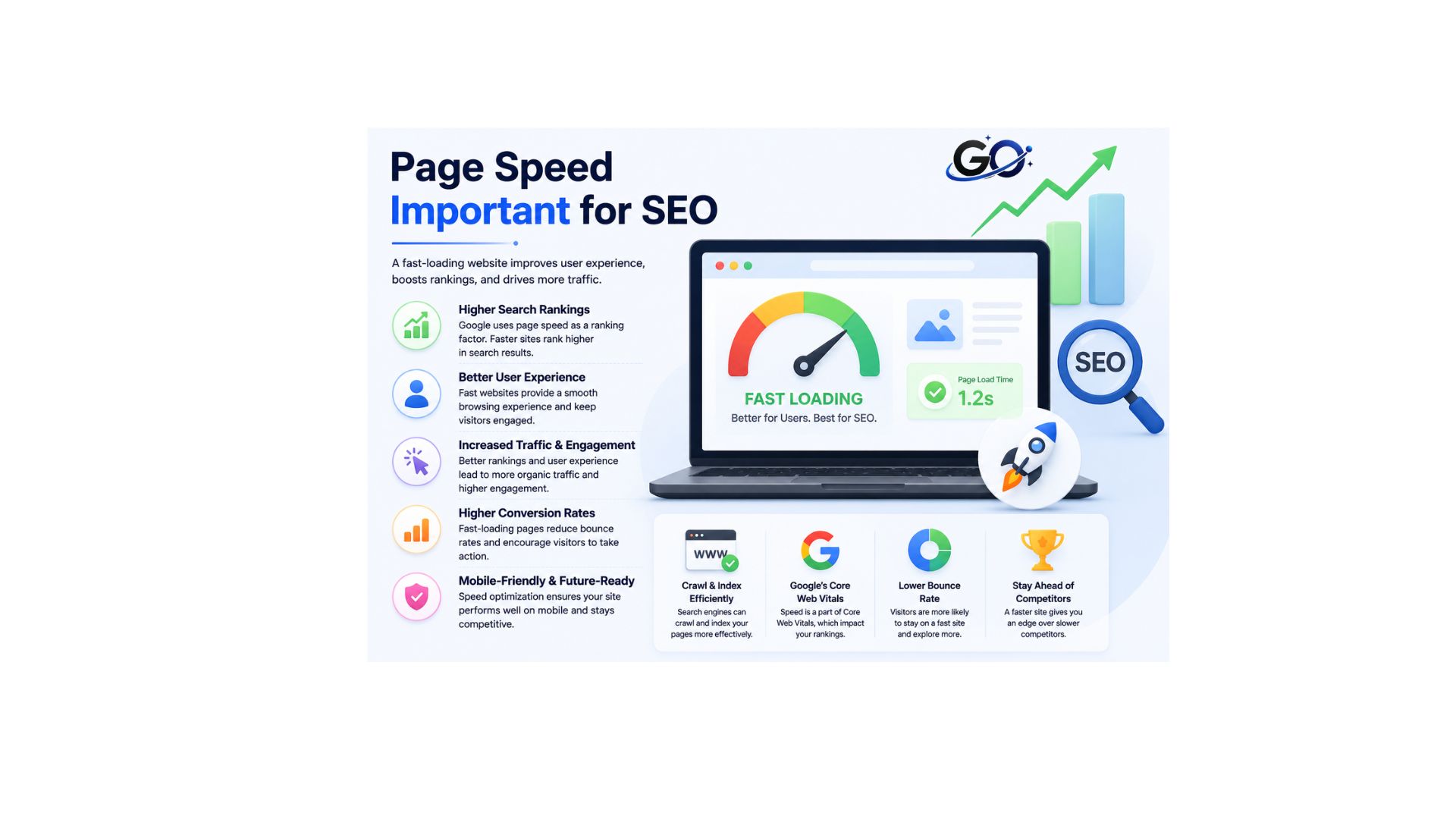
A webpage’s loading time significantly affects how users and crawlers engage with it.
Your users will have a greater bounce rate and fewer conversions if your page loads more slowly. This is particularly true for people who use mobile devices or have worse internet connections, as these populations are most affected by slow load times.
Additionally, slower crawler loading speeds may negatively affect indexing. This applies to both standard search engine crawlers (SEO) and LLMs such as ChatGPT (also known as “Generative Engine Optimisation” or “GEO”).
Best Practices for Page Speed Optimization
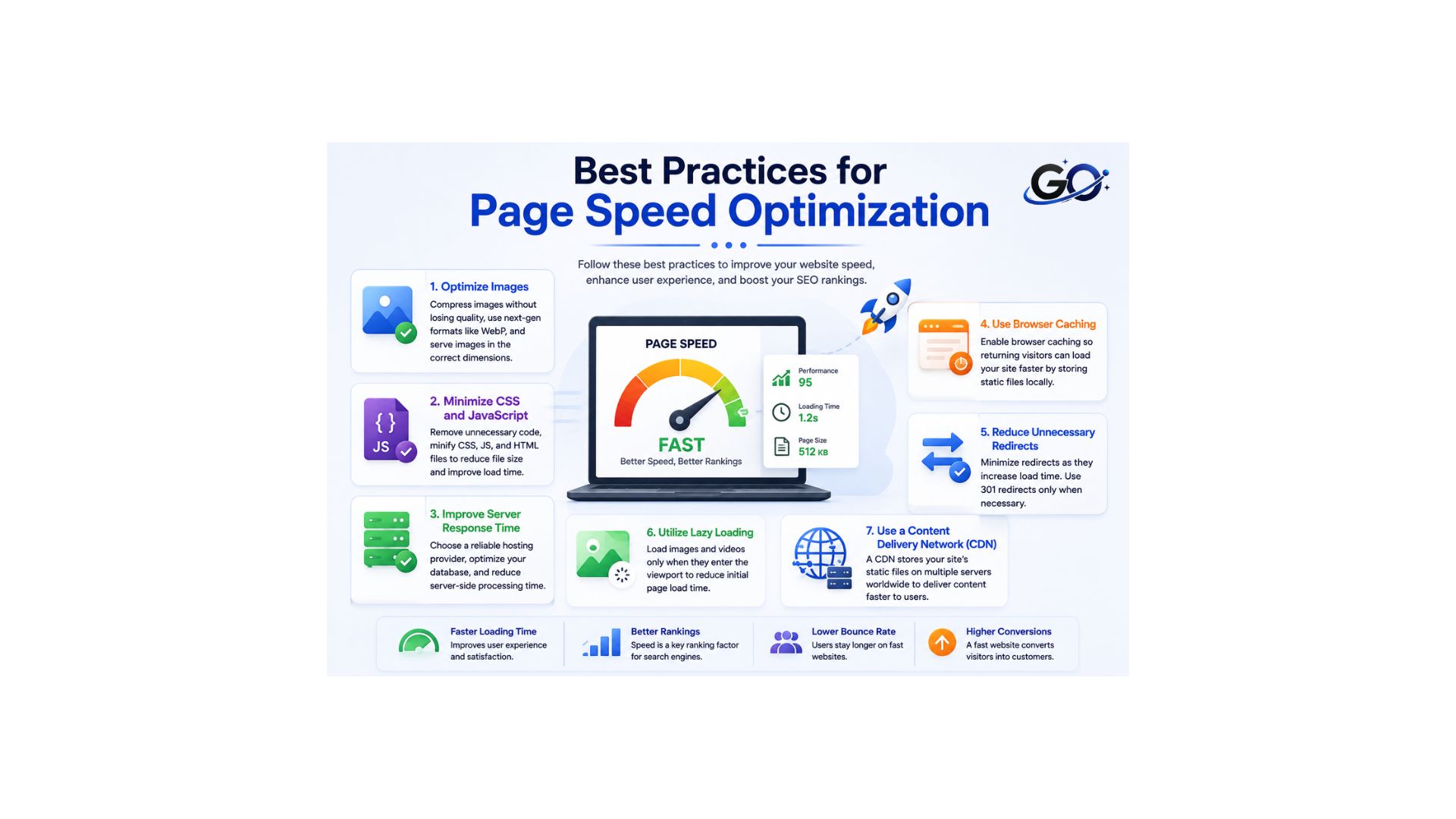
There are several practical ways to improve page speed. Website owners should focus on the issues that have the biggest effect on performance rather than making unnecessary changes.
Optimize Images
One of a webpage’s biggest resources is frequently an image. Large, uncompressed images might make pages take longer to load.
Before uploading, resize and compress photos to the proper dimensions. Reducing file size without sacrificing appropriate quality is another benefit of modern image formats.
Appropriate lazy-loading strategies can stop superfluous resources from loading too soon for images that are not immediately visible.
Minimize CSS and JavaScript
Many websites use JavaScript and CSS, but extraneous code can make a browser work harder.
Avoid loading scripts that aren’t necessary for a certain page and, if at all possible, remove unnecessary CSS and JavaScript. By eliminating extraneous characters and spaces, minifying files can help decrease their size.
Improve Server Response Time
Time to First Byte (TTFB), or how long it takes your server to reply to a browser’s request, is a crucial component of page speed. Longer page load times can result from a slow server response time that bottlenecks the entire loading process. Take into account the following tactics to shorten server response times:
- Upgrade Hosting: Ensure that your hosting provider offers fast and reliable servers. Consider using a VPS or dedicated hosting if you’re currently using shared hosting.
- Optimise Databases: To guarantee quick query results, clean up and optimise your databases on a regular basis.
- Use a Fast DNS Provider: The speed at which your server is located is greatly influenced by your DNS provider. Choose a DNS provider with a reputation for speed.
Optimizing server response times can significantly improve the speed at which your website loads. It enhances user experience, reduces bounce rates, and improves SEO performance.
Use Browser Caching
Your server instructs browsers to save a copy of a loaded page when browser caching is enabled. The page loads considerably more quickly when a user returns.
You can add some code to your browser to activate browser caching.htaccess file or using a plugin. One of the most well-liked WordPress caching plugins is WP Super Cache.
Reduce Unnecessary Redirects
Before users get to the final page, redirects may add more steps. Redirects are occasionally required, but needless redirect chains can be time and resource-consuming.
Whenever feasible, make sure internal links connect straight to the correct URLs by reviewing them on a regular basis.
A more effective route between users and the material they wish to view can be created by cutting down on pointless redirection.
Utilizing lazy load
Delaying the loading of media or content on a website that is not in the user’s initial view is known as lazy load. Many website builders use lazy loading on every page, so this happens automatically. Placing larger or higher-resolution elements lower on your page to give them time to load before people scroll down is another way you can contribute.
Consider carefully what loads initially on each page of your website. Since this is what visitors see when they first visit your website, give above-the-fold content top priority. It should be straightforward but powerful, and it should be used to keep users interested while the remainder of the website loads.
Use a Content Delivery Network
A globally dispersed network of proxy servers and accompanying data centers is known as a content delivery network (CDN).
By caching web content (such as pages, photos, and videos) in proxy servers near your location, they enhance content delivery, performance, and quality.
You might want to look into mobile CDNs as well. These are intended to improve the delivery of content, particularly on wireless and mobile networks. They therefore seek to significantly enhance website performance.
But keep in mind that privacy could be a problem. If so,.env files are a helpful method of locking up sensitive data in a key-value format and keeping it off the cloud.
Page Speed and Core Web Vitals
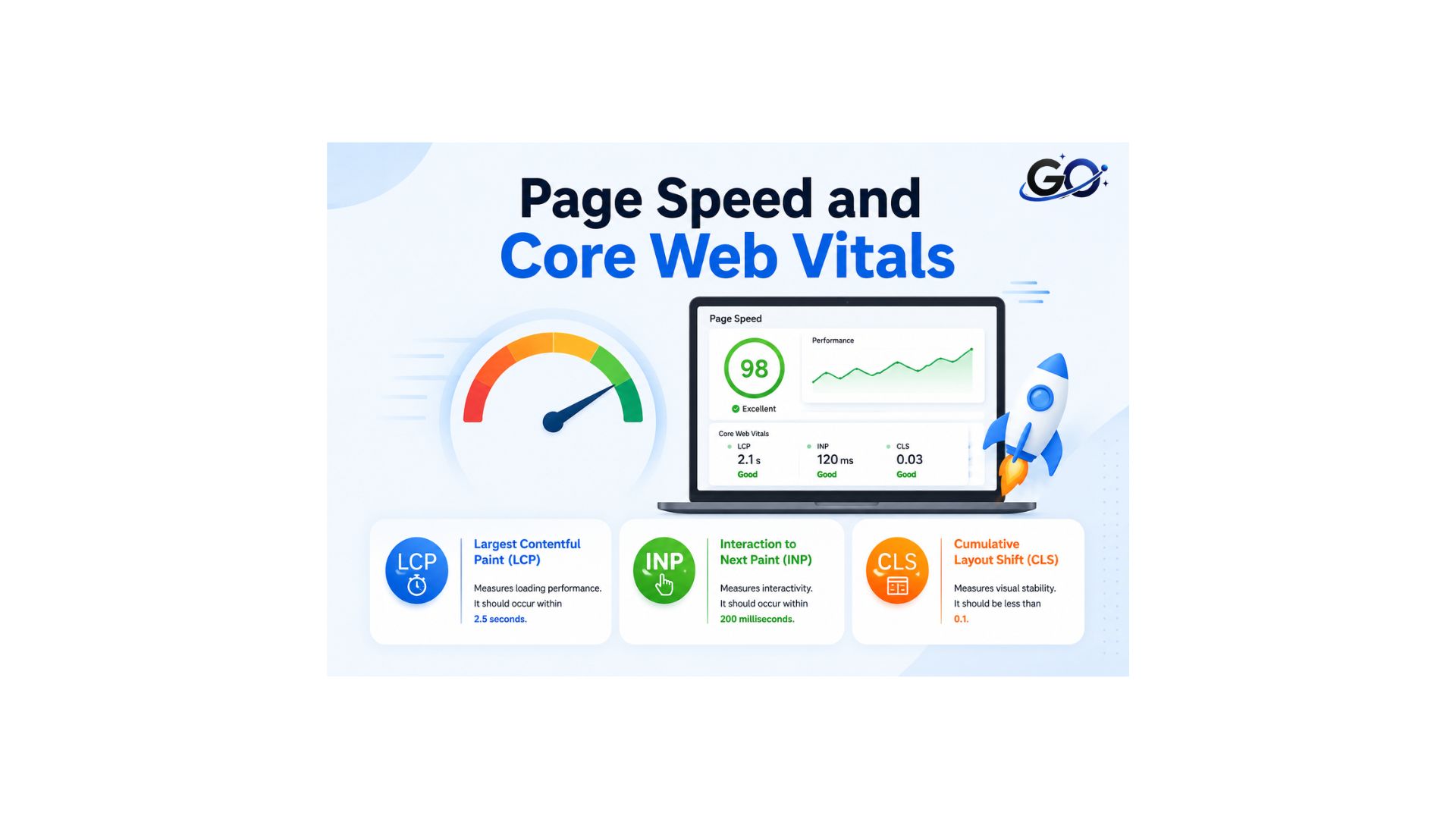
Core Web Vitals are important performance metrics that focus on different aspects of page experience.
Largest Contentful Paint (LCP)
The time it takes for the largest element in the viewport to fully load is known as Largest Contentful Paint. The following are the benchmarks for this metric:
LCP benchmarks.
It is common for the largest element to be an image, so image optimization is the main contributor to this metric. On top of that, LCP depends on server response times, render-blocking code, and client-side rendering.
Interaction to Next Paint (INP)
In March 2024, INP took the place of First Input Delay (FID) as a Core Web Vital, and it is still a crucial signal in 2026. It gauges how fast your page reacts to each and every user interaction, not just the initial one. Every keystroke, tap, and click is recorded.
High INP usually means too much JavaScript is running on the main thread, blocking the browser from responding to the user promptly..
Cumulative Layout Shift (CLS)
Cumulative Layout Shift measures whether the elements on the page move around when loading. Say, a page looks like it’s ready to use, but then a new image appears at the top and the rest of the content is pushed downward — that’s a layout shift.The following are the benchmarks for this statistic.
CLS depends on properly set size attributes and on having your resources load in a specified sequence, top to bottom.
How to Test Page Speed
Testing is an important part of page speed optimization. Website owners can use performance testing tools to identify slow resources, performance issues, and Core Web Vitals problems.
Test both mobile and desktop versions because performance can vary between devices and connection types.
It is also useful to test important pages separately. The homepage, blog posts, landing pages, and product pages may have different performance characteristics.
Common Page Speed Optimization Mistakes
Focusing only on a performance score can be a mistake. Website owners should also review specific issues and real-world performance.
Uploading large images, using poorly optimized themes, unnecessary plugins, and third-party scripts can slow down a website.
Ignoring mobile performance is another common issue. Always test your website on both desktop and mobile devices for better speed and user experience.
Monitoring and Measuring Performance
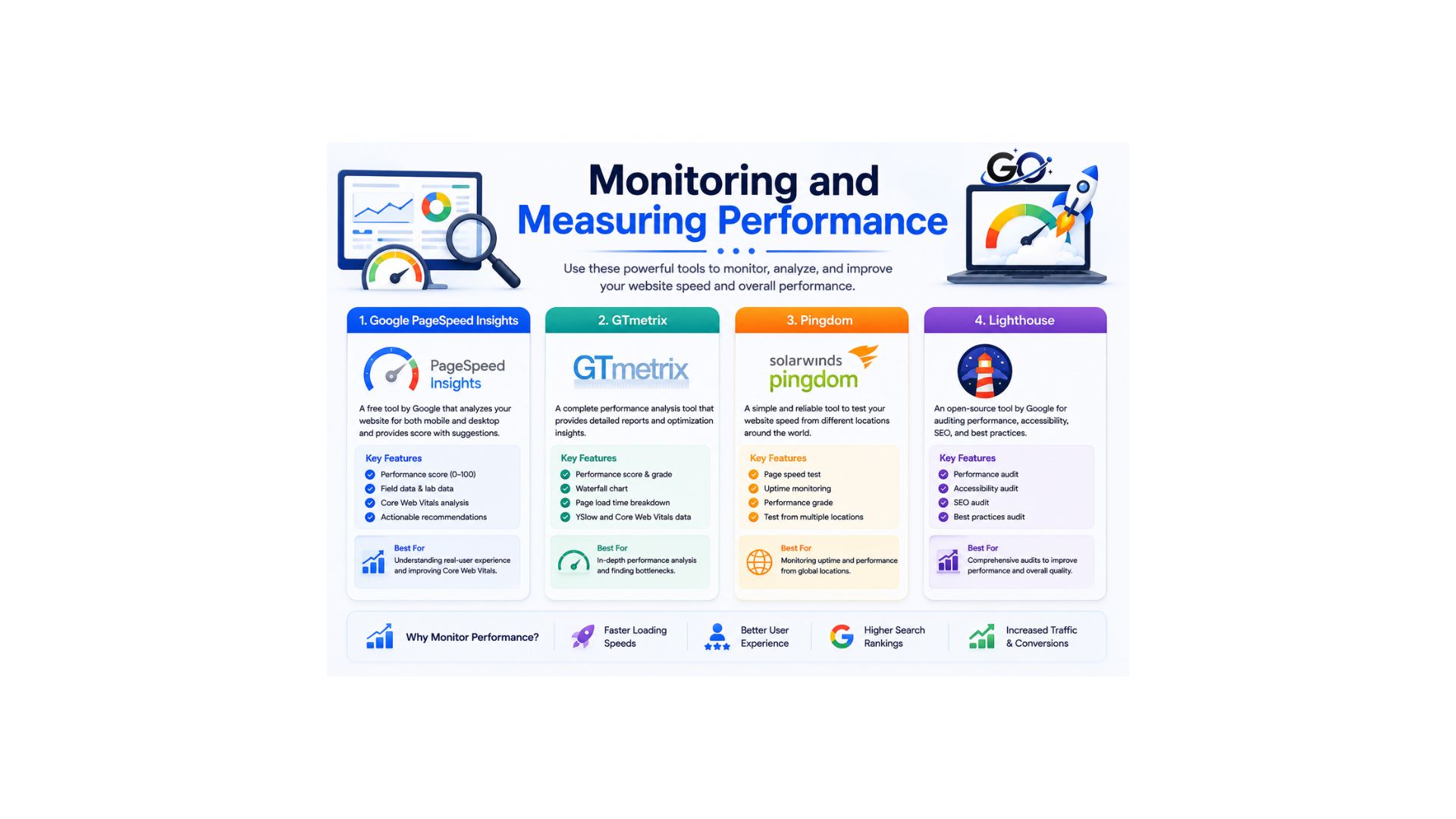
Continual monitoring and performance testing are essential for maintaining and improving page speed. There are several tools available for monitoring:
- Google PageSpeed Insights: Provides a detailed analysis of your website’s performance and offers suggestions for improvements.
- GTmetrix: Analyzes page speed and performance, providing insights and recommendations.
- Pingdom: Offers real-time monitoring and performance reports, helping you identify bottlenecks and issues as they arise.
- Lighthouse: An open-source, automated tool for improving the quality of web pages, focusing on performance, accessibility, SEO, and more.
Test your site regularly with these tools to ensure it continues to perform well and meets the latest standards for speed and optimization.
Final Thoughts
Page Speed Optimization Best Practices for SEO focus on creating a website that loads efficiently, responds quickly, and provides a smooth experience for visitors.
Optimizing images, reducing unnecessary code, improving server performance, using caching, reducing redirects, and monitoring Core Web Vitals can all contribute to better website performance.
However, page speed should not be treated as the only SEO priority. High-quality content, search intent, mobile usability, accessibility, internal linking, and technical SEO are also important.
FAQs
1. What is page speed optimization?
In order to improve user experience and search engine results, page speed optimisation uses a variety of strategies to shorten the time it takes for a webpage to load.
2. Why is page speed critical for SEO?
Page speed optimization is a ranking criteria used by Google. Websites that are faster are more likely to rank higher in search results, increasing their visibility and traffic.
3. How do I measure my website’s speed?
You may assess the speed of your website and get practical suggestions for enhancement by using tools like Google PageSpeed Insights, GTmetrix, and Pingdom.
4. What is lazy loading?
Lazy loading is a strategy that reduces initial page load times by delaying the loading of non-essential resources (such as graphics and videos) until they are required.
5. Does page speed affect mobile SEO?
Indeed, mobile visitors are particularly concerned about page speed. In addition to improving user experience, a website that loads quickly can boost SEO results.