

User experience (UX) is the process of designing web experiences that are intuitive and positive for people. It spans many aspects of your website, including the loading speed of individual pages, navigation, and others.Additionally, it has several connections to your optimization efforts even though it is not a part of the SEO process.
UX is not regarded as a direct ranking criteria in any official documents. However, this does not diminish its significance. It outlines how users engage with your website. It affects your primary website metrics, which Google takes into account when determining your ranking, among other things. This way, SEO and user experience are tightly bound .
What Is User Experience in SEO?

Search engine optimization focuses on helping users locate relevant information. User experience ensures visitors can easily consume that information after arriving on a website.When both elements work together, websites create positive interactions that encourage longer visits, stronger engagement, and increased customer satisfaction.
Moreover, search engines increasingly recognize behavioral signals that indicate content successfully meets user expectations.
For example, if a visitor searches for an answer but lands on a slow page with confusing navigation, they may have difficulty finding the information they need. A clear layout and useful content can create a much better experience.
How to Improve User Experience for SEO
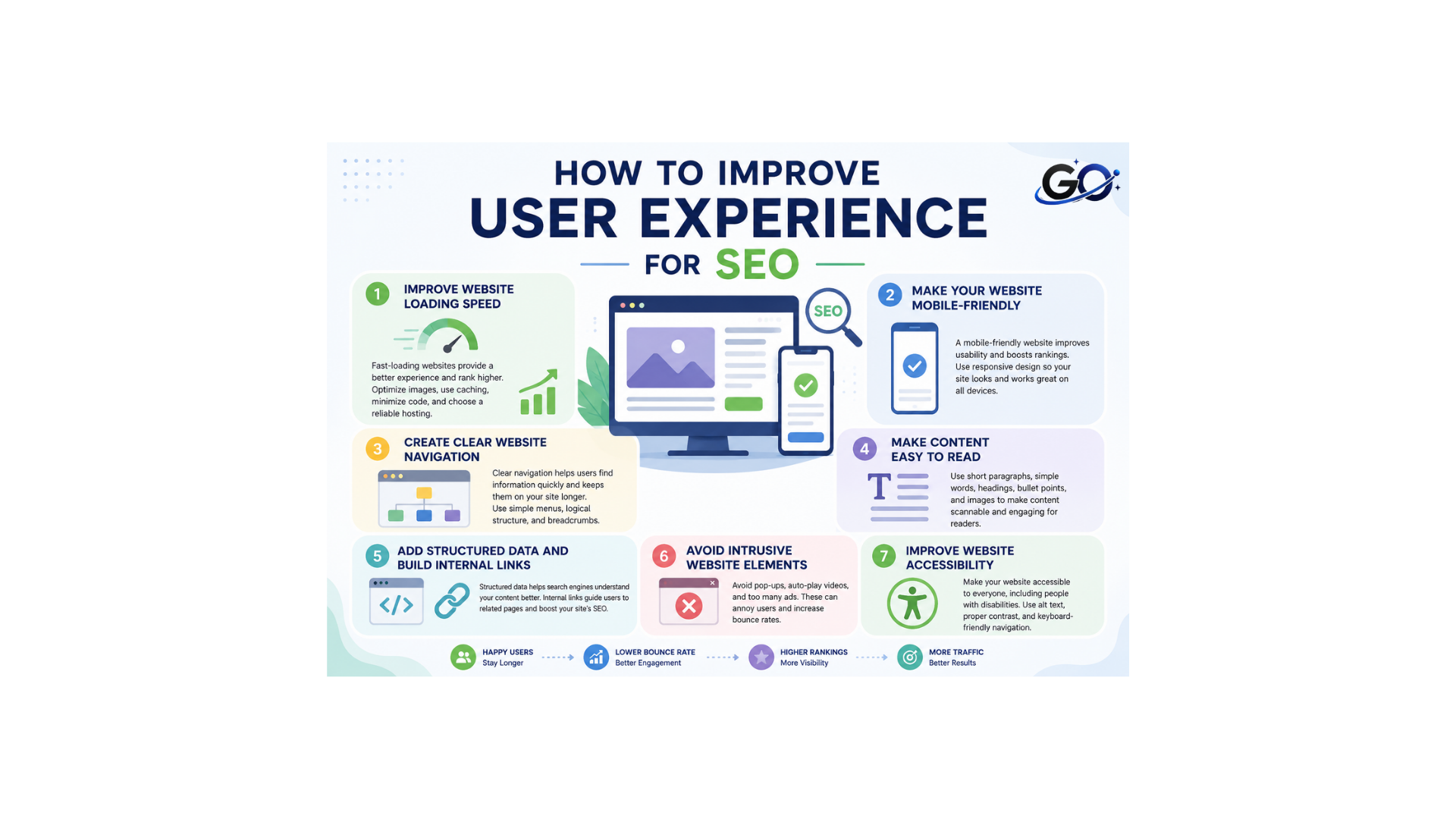
Improving user experience does not always require major design changes. Small improvements to speed, navigation, content structure, and mobile usability can make a website easier to use.
Focus on the areas that create the most difficulty for visitors. Review your website regularly, identify usability problems, and make improvements based on real user needs.
Improve Website Loading Speed
The way users interact with a website is directly impacted by page speed. Users may have to wait before accessing crucial information on slow pages, especially on mobile devices with slower connections.
Users become more irritated with slow-loading websites and quit before the page loads completely. Both user satisfaction and search visibility can be greatly increased by optimising images, cutting out superfluous scripts, and enhancing performance.
Make Your Website Mobile-Friendly
A website should work properly across smartphones, tablets, and desktop computers. Mobile users should be able to read text, click buttons, view images, and navigate menus without difficulty.
Google uses mobile-first indexing, so the mobile version of your website is particularly important for search visibility. A responsive design can help provide a consistent experience across different screen sizes.
Create Clear Website Navigation
Good architecture and navigation define the convenience of use. That’s why they matter for UX. The reason why they matter for SEO as well is that proper navigation can make visitors stay on your site longer, exploring different pages.Engagement and session duration both rise as a result. Good navigation allows users to discover useful content without having to search through the entire website.
Make Content Easy to Read
Readable content is an important part of a positive user experience. Large blocks of text can make articles difficult to scan, especially on mobile devices.Use short paragraphs, descriptive headings, bullet points, simple language, and appropriate spacing.
Headings allow readers to quickly identify the sections that are most relevant to them.Well-organized content with descriptive headings, concise paragraphs, and meaningful visuals encourages visitors to stay longer and explore additional pages.
Add Structured Data and Build Internal Links
An essential component of user experience SEO is navigation. Firstly, it serves your visitors, making your site more intuitive and convenient for them. At the same time, it increases time on page, signalling your relevance to search engines. However, it’s not only about the architecture. It’s also about the logical structure of internal links on your site that you need to create to help users hop from one page to another easily.
Now, about structured data. Markup is a sequence of code. Hence, it doesn’t directly improve on-site user experience. However, it helps search engines understand your pages better and provide richer SERP results. This can help users find what they need, and, at the same time, generate more clicks for you.
Avoid Intrusive Website Elements
Pop-ups, intrusive interstitials, excessive advertisements, and other distracting elements can make websites difficult to use. Visitors should be able to access the main content without unnecessary interruptions.
Interactive elements can still be useful when they serve a clear purpose. The key is to make sure they do not interfere with important information or basic navigation.
A clean and focused layout allows visitors to concentrate on the content they came to find.
Improve Website Accessibility
Accessible websites are more user-friendly for individuals with varying abilities and frequently adhere to best practices that enhance usability for all users.
A better overall experience is facilitated by keyboard navigation, clear labels, adequate colour contrast, and informative alt text.
An accessible website can provide a better experience for visitors while making content easier to understand and navigate.
User Experience and Core Web Vitals
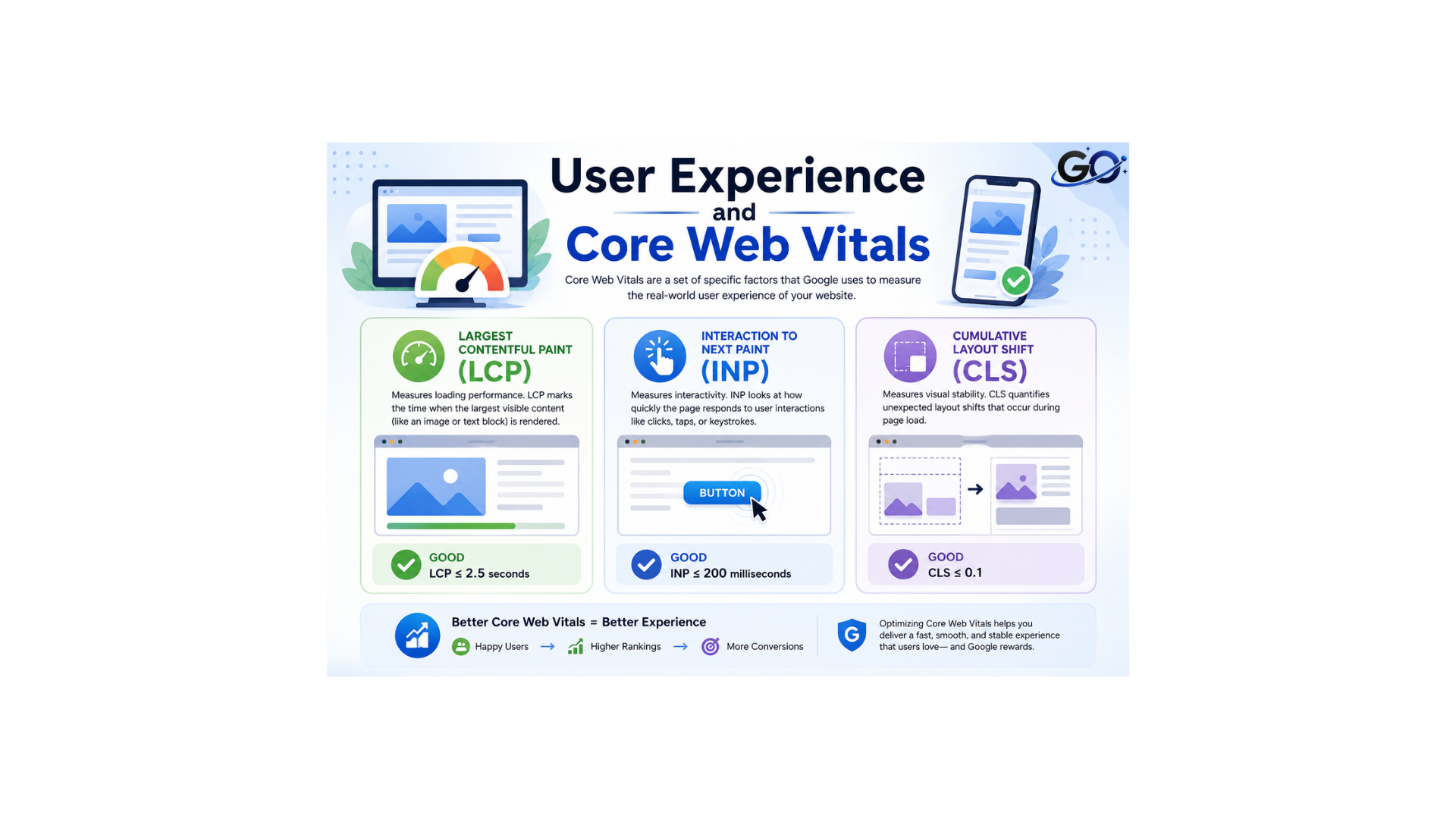
Core Web Vitals measure important aspects of webpage experience. They focus on loading performance, responsiveness, and visual stability.
The three main metrics are:
- Largest Contentful Paint (LCP): Measures how quickly the main content becomes visible.
- Interaction to Next Paint (INP): Measures how responsive a page is to user interactions.
- Cumulative Layout Shift (CLS):measures the unanticipated movement of page elements during loading.
Improving these metrics can make webpages feel faster, more responsive, and more stable. However, Core Web Vitals are only one part of user experience. Content quality, navigation, accessibility, and mobile usability also matter.
Common User Experience Mistakes
Several UX problems can make a website difficult to use. Complicated navigation can prevent visitors from finding important pages, while slow loading speeds can cause frustration.
Other common mistakes include long blocks of text, unclear headings, broken links, difficult forms, excessive pop-ups, poor contrast, and confusing layouts.
Regularly reviewing your website on different devices can help identify these issues. Website owners should also pay attention to feedback and performance data to understand where improvements are needed.
UX Metrics Worth Monitoring
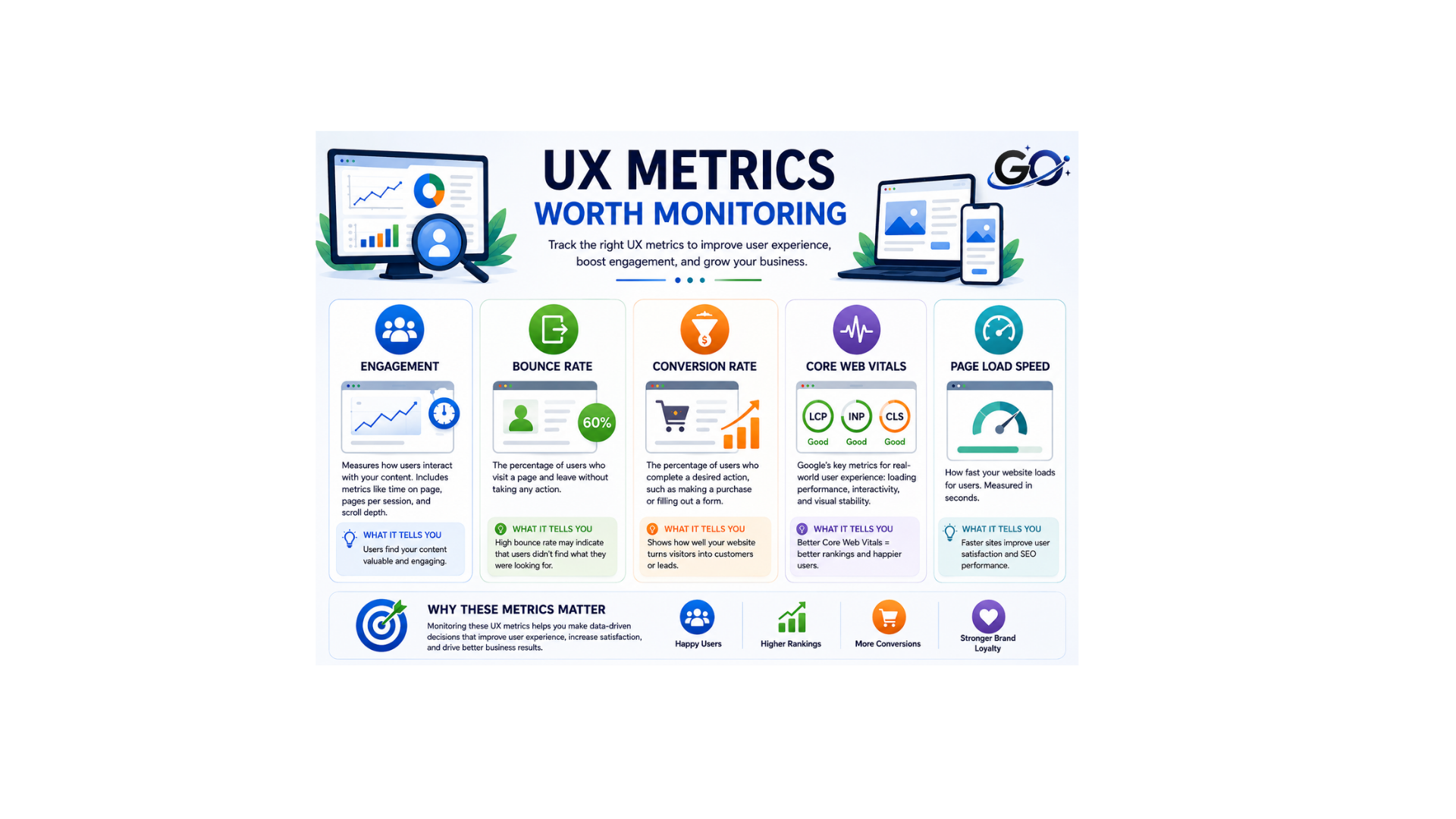
Improving user experience starts with measuring it.
- Engagement
Speed, mobile-friendliness, and other elements we mentioned earlier shape the foundation of UX. And they all affect how engaged a person will be on your site. When all these elements are handled well, often with the help of professional UX design services, people will be more likely to spend time on your site and visit multiple pages. And it can also encourage people to share your site with others. High engagement is a powerful driver of traffic, as this is a strong signal of your value and relevance.
- Bounce Rate
A significant percentage of your guests depart shortly after arriving? The bounce rate is that. And inadequate UX is frequently the problem. For search engines, it is also quite important. The higher it rises, the more noticeable the signal Google gets that your website isn’t relevant or helpful to users. This could result in a low ranking. Additionally, a good user experience is essential to lowering bounce rates and irritation.
- Conversion Rate
The percentage of website visitors that finish a desired action is known as the conversion rate. These activities could be registering, filling out a form, or completing a transaction. Visitors may find it simpler to accomplish these tasks if they have a positive user experience. Monitoring conversions aids in determining how successful your website is.
- Core Web Vitals
Key elements of user experience and website performance are measured by Core Web Vitals. They prioritise responsiveness, visual stability, and loading speed. A more seamless surfing experience can be achieved with good Core Web Vitals. To find performance problems, routinely check these metrics.
- Page Load Speed
Page Load Speed measures how quickly a webpage loads and becomes usable. Slow-loading pages can frustrate visitors and may cause them to leave. Improving images, scripts, and other page elements can help increase loading speed. A faster website provides a better overall user experience.
Final Thoughts
User experience matters for SEO because a website should be useful to both search engines and real visitors. A fast, mobile-friendly, accessible, and well-organized website makes it easier for people to find and understand information.
Focus on useful content, clear navigation, readable pages, strong internal linking, mobile usability, and good website performance. Rather than optimizing only for rankings, create an experience that genuinely helps visitors.
FAQs
1. Why does user experience affect SEO?
User experience influences visitor engagement, satisfaction, and website usability. Well-designed websites are more likely to obtain sustainable organic presence because search engines see positive behavioural signals like longer sessions, lower bounce rates, and stronger interactivity.
2. How can SEO performance improve with website speed?
Websites that load quickly increase engagement and conversion rates while lowering visitor irritation. Better loading performance also supports smoother navigation, improved mobile experiences, and stronger customer satisfaction, all of which contribute to healthier overall SEO performance.
3. What role does mobile usability play in UX?
Mobile usability ensures visitors can browse comfortably on smartphones and tablets. Responsive layouts, readable text, simple navigation, and accessible buttons create positive experiences while supporting improved search visibility across mobile search results.
4. How can I raise my metrics for website engagement?
Focus on faster load times, better content structure, and clear navigation to encourage users to stay longer and explore more pages
5. How does readable content improve user experience?
Readable content allows visitors to process information quickly. Simple language, bullet lists, detailed headings, and brief paragraphs all increase accessibility while enticing visitors to stay on the page and explore more.